Character Relationship Chart Maker for Any Story
Build character relationship charts for anime, novels, TV shows, games, and more — free, AI-powered, no sign-up.
Demo Maps
Click a map to explore it interactively — zoom, pan, and see all relationships.
Featured Maps











What's New
View all →- Groups and Tags now live in the left sidebar alongside Characters — see everything at a glance, with "All" opening full management
- Rename groups and tags — the name is now editable, not just the note
- Click any character in the sidebar list to open its details, no need to hunt for the node on the canvas
- Teach the auto-coloring: pick a color and "apply to all" — every relationship with that label, now and in future, takes the color
- Sign in directly from the My Works dialog when you are not logged in yet
- Squashed a runaway performance bug that could spike CPU and freeze or crash the editor on some charts — the editor stays smooth now
- Mutual relationships — a "Mutual" toggle draws one double-headed arrow for two-way bonds, instead of forcing you to draw two identical arrows
- Per-relationship color picker — keep your own labels and set any line color yourself, with a hint of which colors are already in use
- New color guide — a "?" in the Relationships legend shows exactly which keywords map to which color
- Fixed the Groups / Tags entry that stayed hidden until you already had one — the classic chicken-and-egg trap
- Smoother node highlight — no more scaling up and snapping back when a node lights up
- Homepage now plays real screen-recording demos for each feature — drag & connect, AI chart builder, and share & export
- Carousel auto-advances when the video finishes; hover pauses playback with a live progress bar
- Undo / Redo (Ctrl+Z / Cmd+Shift+Z) — 15-step history stack so you can always recover a mistake
- Undo and Redo buttons added to the canvas toolbar above the save button
- AI chat no longer truncates long messages — full input is shown in the conversation
- Saving an untitled chart on mobile now shows a toast prompt instead of silently failing
- Cover image in the sidebar now shows in full aspect-fit instead of being cropped
- CC BY-NC 4.0 license toggle added to the editor sidebar — locked on for free users with a Pro upgrade prompt
- Project visibility simplified to Public / Private — private charts are a Pro feature
- License and visibility are now saved to the database with every chart save
- QR code generator built into every public character relationship chart
- One-click embed code — drop any chart into a blog, wiki, or Notion page
- Copy share link directly from the chart page
What is a Character Relationship Chart?
A character relationship chart (also called a connection chart or character diagram) is a visual tool that shows how people, characters, or entities are linked to each other. Unlike simple family trees, a relationship chart supports any type of connection — romance, rivalry, alliance, hierarchy, friendship — with labeled edges and color-coded groups that make complex networks instantly readable.
Whether you're charting anime characters, historical figures, TV show families, political networks, or business org structures, this character chart maker turns tangled connections into clear, interactive visualizations. With the built-in AI assistant, paste a paragraph from a novel and have the entire character relationship chart generated in seconds — or describe characters in plain English to build your chart step by step.
How to Create a Character Relationship Chart
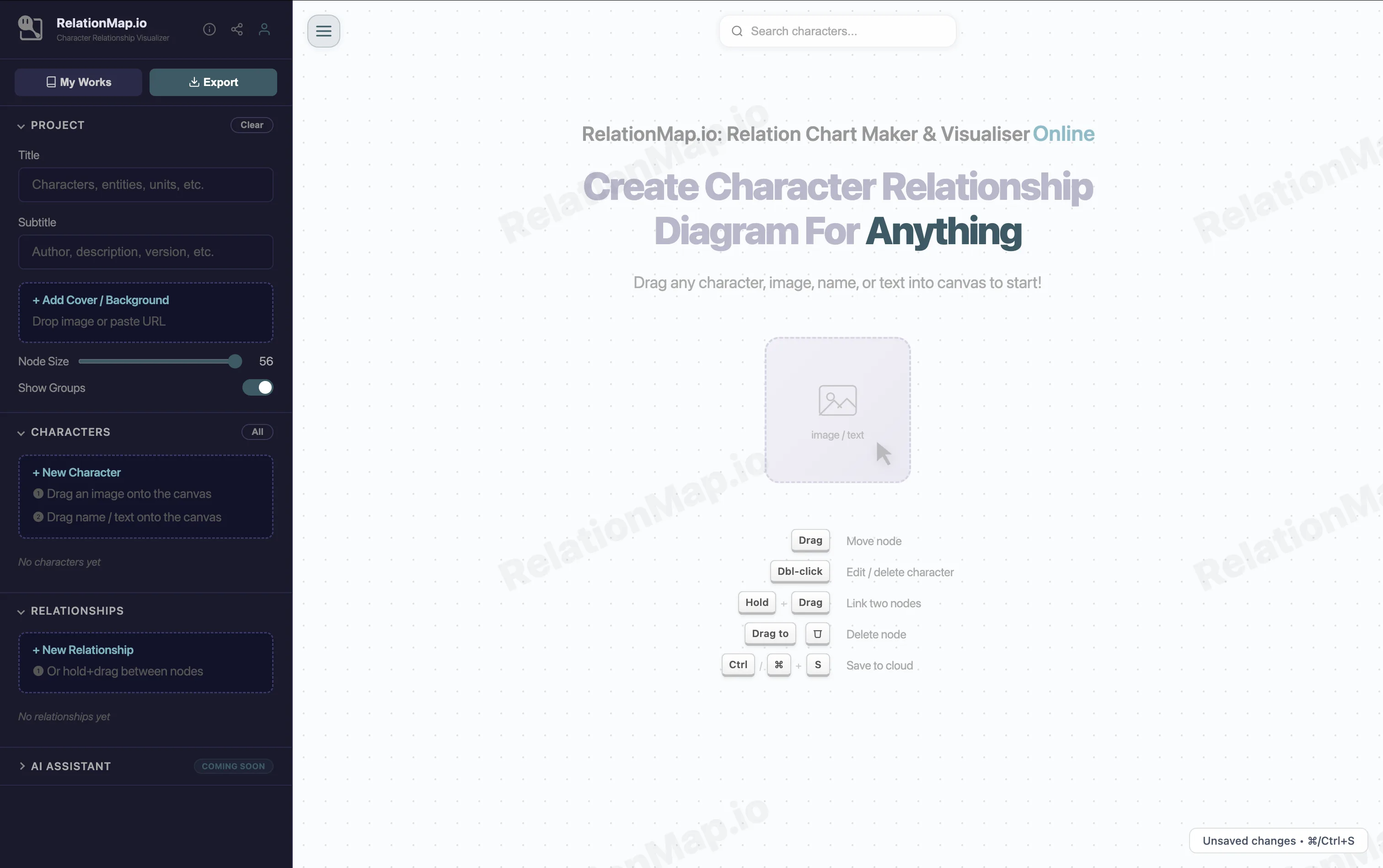
Add Characters
Type names, drag images, or paste a story — the AI extracts characters and builds your character chart automatically.
Connect & Label
Draw lines between characters and label each relationship, or let AI detect connections to complete your relationship chart.
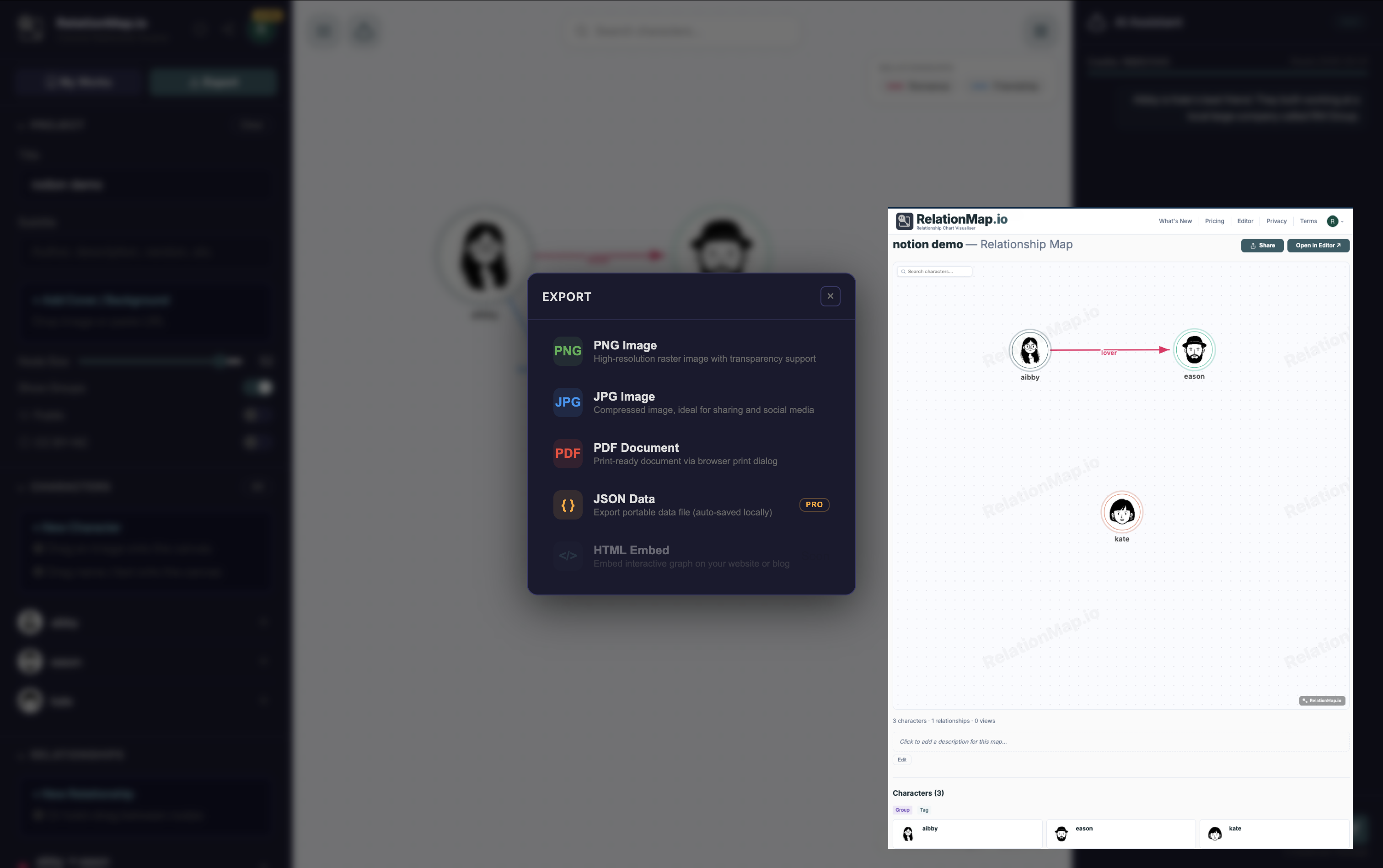
Share & Embed
Share a live link, embed your character relationship chart on any site, or export as PNG. Free charts are CC BY-NC — open to remix.
Frequently Asked Questions
Is RelationMap.io free?
Yes — creating character relationship charts is completely free, forever. Your charts are saved in your browser with no account needed. Sign up free to get unlimited cloud projects. Need AI chart generation and private maps? Pro starts at $9.90/month.
Do I need to sign up to make a character relationship chart?
No sign-up needed. Open the chart maker and start building immediately — zero forms, zero friction. Create an account only when you want to save to the cloud or share your chart with a public link.
What kinds of relationship charts can I create?
Any network with connections. Popular uses: anime & manga character charts, TV show family trees, novel & game character maps, historical figure connection charts, political networks, business org charts, equity structures. If things are connected, you can chart them. Browse Featured Charts for inspiration.
How is this different from a family tree tool?
Family tree tools only support parent-child relationships. RelationMap.io is a full character relationship chart maker — it supports any relationship type: romance, rivalry, alliance, friendship, mentorship, enmity. Auto-colored edges and group clustering make even complex character networks instantly readable.
Can AI build my character chart automatically?
Yes — the AI Assistant (Pro) is a character relationship generator. Paste a story excerpt, episode summary, or character descriptions and AI extracts every character and relationship into a complete chart in seconds. Or type natural language commands like "add a rivalry between X and Y" to edit conversationally. Each message uses 3 credits from your 1,000/month allowance.
How do I save my chart?
Your character relationship chart auto-saves to browser local storage as you edit — no account needed. For cloud backup and cross-device sync, sign in and press Ctrl/⌘+S. Cloud projects can be shared, forked, and accessed from any device.
Can I share my character relationship chart?
Yes! Every public chart gets a shareable link — anyone can view and interact with it. You can also embed your chart on any website or Notion page using the embed code in the Share menu. Pro users can make charts private or password-protected.
Can I embed a relationship chart on my website?
Yes. Open any public chart, click Share → Embed, and copy the one-line iframe snippet. Drop it into your blog, wiki, or Notion page to show an interactive, live connection chart without any plugins.
What license are free charts under?
All free maps are published under CC BY-NC 4.0 (Creative Commons Attribution-NonCommercial). Anyone can view, fork, and remix your character chart for non-commercial purposes — building an open library of relationship charts for everyone. Need commercial use rights? Upgrade to Pro.
Can I export my relationship chart?
Yes. Export as PNG for images, PDF for documents, or JSON for data backup and import. You can also share a live interactive link that others can zoom, pan, and explore in full detail.
Can I import characters from a story or list?
Yes — two ways. Use JSON import to load a previously exported chart. Or use the AI character relationship generator (Pro): paste any text — a chapter, synopsis, or Wikipedia article — and AI builds the full chart automatically.
Can I fork or remix community charts?
Yes! Browse Featured Charts, find a character relationship chart you like, and fork it to create your own version. It's the fastest way to get started with a complex network.
Is my data private?
Local-only charts never leave your browser. Cloud projects are private by default — only you can access them unless you explicitly share. We do not sell or analyze your data. See our Privacy Policy for full details.
Does it work on mobile?
Yes. RelationMap.io is 100% browser-based — no downloads, no app store, no plugins. Works on Chrome, Firefox, Safari, and Edge on both desktop and mobile. Viewing and sharing character charts works great on mobile; complex editing is easier on a larger screen.